
Fringe Benefit Management for Construction Payroll Teams (2026)

The best fringe benefit management tools for construction payroll teams run fringe inside certified payroll, not a separate spreadsheet. eBacon calculates fringe from the wage determination, moves it into a bona fide fringe trust each pay period, and reports it on the WH-347 from the same payroll data.
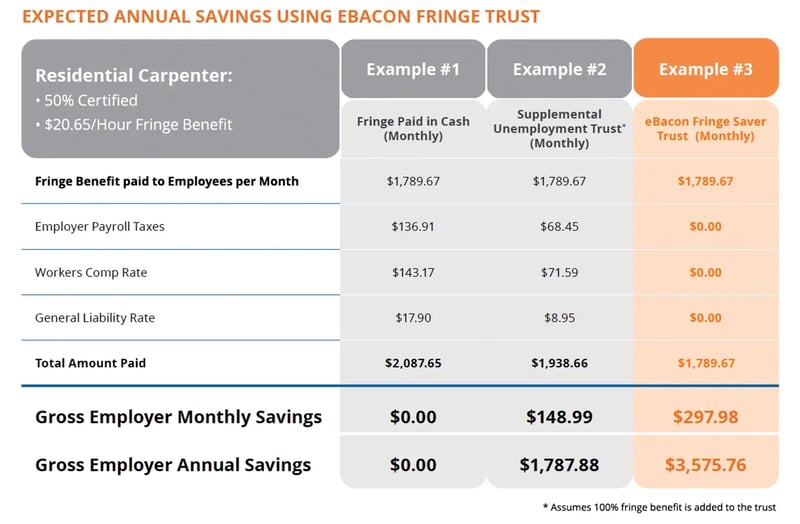
Fringe in the trust comes out of taxable cash wages, and contractors who make the switch save an average of $4 per labor hour.
What does the eBacon fringe trust include?
Bona Fide Fringe Trust
eBacon converts prevailing wage fringe obligations into pre-tax 401(k) contributions through an IRS-compliant bona fide trust, taking those dollars out of taxable payroll with every check processed.
Real-Time Fringe Validation
eBacon checks fringe calculations and payment amounts in real time and flags errors before they reach payroll, including over- and underpayments and missing data.
Employee choice
eBacon lets employees take fringe as a weekly cash distribution by direct deposit or pay card, or leave it in the trust as tax-preferred retirement savings. Their money, their call.
Benefit options
eBacon routes fringe allocations into 401(k) plans, Health Reimbursement Accounts, FSAs, Dependent Care Accounts, college savings plans, and more, so you can offer a benefits package that helps attract and keep skilled workers.
Trust Administration
eBacon administers the trust directly as Third-Party Administrator, handling deduction processing, employee enrollment, eligibility tracking, and reporting. Your payroll team doesn’t have to moonlight as a benefits department.
Curious what the trust would do for your crew?
Plug your fringe rates and hours into the FringeMAX Trust Calculator and get your number.
What is eBacon?
How does eBacon fringe trust work?
- 1. Set Up Your Trust
- 2. Assign Determinations
- 3. Contributions Process
- 4. Employees Choose
- 5. Audit Ready
Set Up Your Trust
Connect your projects and prevailing wage fringe rates to eBacon’s bona fide fringe trust during guided onboarding.
Assign Determinations by project
(State/Davis-Bacon/SCA)
Apply a wage determination to each project and worker classification. eBacon applies fringe credits where they apply and routes the remaining fringe into the trust.
Contributions Process Pre-Tax
Each pay period, eBacon deposits fringe into the trust as pre-tax 401(k) contributions, so taxable payroll drops right away, not at year-end.
Employees Choose Their Benefits
Workers pick how to use their fringe: a weekly cash distribution by direct deposit or pay card, or tax-preferred savings through a 401(k), HRA, or Dependent Care account.
Stay Compliant and Audit-Ready
eBacon keeps organized records of every contribution, distribution, and employee election, so you’re ready for a Davis-Bacon, ERISA, or IRS review at any point.
Who is the eBacon fringe trust built for?
Open-shop and merit-shop contractors working prevailing wage jobs. No union affiliation is required. If your crews are all union, your union fund already handles fringe, so the trust isn’t the right fit, but you can still run certified payroll and the rest of the eBacon platform.
What do employees get out of a fringe trust?
More options, and more control over their own money. With a fringe trust, employees can:
-
Receive fringe by direct deposit each week, like a paycheck.
-
Receive fringe on a pay card each week.
-
Invest fringe in a 401(k), HRA, or FSA.
Download this PDF for employers to learn how it works
Download this PDF for CPA and tax professional reference
What else do payroll teams ask about fringe benefits?
Yes. Davis-Bacon lets contractors meet the fringe portion of the prevailing wage with cash, with contributions to a bona fide benefit plan or trust, or with a combination of both. Contributions to eBacon’s bona fide fringe trust count toward the fringe rate on the wage determination, as long as the total paid meets or exceeds it.
Any fringe not contributed to the trust is paid as cash wages.
You can generally take credit for bona fide benefits you already provide, like a health plan, against the fringe rate, then pay the rest as cash or into a plan. If the benefit also covers private work, DOL generally requires the credit to be annualized across all hours worked.
eBacon annualizes fringe credits automatically and routes the remaining fringe into the trust .
Run your numbers through the FringeMAX Trust Calculator. Enter your prevailing wage hours and fringe rates, and it estimates what moving fringe from taxable cash wages into eBacon’s bona fide fringe trust would save in payroll taxes and wage-based insurance costs. It’s the fastest way to see the cash vs. trust difference for your own crew.
Your CPA will want fringe contributions, distributions, and employee elections broken out by employee, project, classification, and pay period, and those numbers should tie to certified payroll. eBacon keeps those records together as part of payroll, so year-end reconciliation and audit requests don’t start with a records hunt.
Your fringe obligation doesn’t change, but how you report paying it does. On the WH-347, fringe contributed to a plan or trust is reported differently from fringe paid as cash. eBacon generates the WH-347 directly from payroll data, so trust contributions and cash fringe land in the right place automatically.
Ready to stop overpaying for fringe?
Paying fringe in cash costs more than most contractors realize. eBacon’s bona fide fringe trust moves fringe out of taxable payroll, saves contractors an average of $4 per labor hour, and gives employees more options, all while staying compliant with state and federal prevailing wage requirements.
Run the FringeMAX Trust Calculator, then request a demo to see the trust in action.